← 返回 2026-10-02

4Director:用刚性3D几何控制视频世界模型 4Director: Controlling Video World Models with Rigid 3D Geometry

Wei Cao, Hao Zhang, Vikram Voleti, Yuqun Wu, Mallikarjun B R, Shimon Vainer, Mark Boss, Yaoyao Liu 📅 2026-10-01 👍 18 2026-11-11 18:30
3D场景表示 可控扩散模型 数据集构建 相机与物体轨迹控制 视频世界模型 视频生成

以完整物体网格加逐帧刚体变换的4D场景,精确控制视频里的相机与物体运动

前置知识

视频世界模型(Video World Model)

指能从当前观测(如一张图)出发、按给定条件滚动预测未来视频帧的生成模型,代表工作有Genie、Oasis、GameNGen等。本文采用更狭义的定义(与VerseCrafter一致):世界模型的输出必须严格遵循一个显式、可编辑的场景状态(相机位姿+每个物体的轨迹),而不是只靠文本或交互自由展开。

4Director自称世界模型,其核心主张正是控制信号是显式3D场景而非模糊文本;理解这一定义才能明白它和普通可控视频生成工作的定位差别。

扩散Transformer与流匹配(DiT & Flow Matching)

Wan2.1-VACE-14B是潜在视频扩散Transformer(DiT),在VAE压缩的低维 latent 空间上做去噪,训练目标是流匹配:把干净 latent $z$ 与高斯噪声 $\epsilon$ 按 $z_k=(1-\sigma_k)z+\sigma_k\epsilon$ 混合,模型学习预测速度场 $\nu\approx\epsilon-z$,推理时沿学到的速度场积分20步即可采样。

Motion Adapter的训练损失就是这一流匹配目标(论文Eq.4),推理用20步采样加classifier-free guidance 5.0,不懂流匹配就读不懂它的训练与生成过程。

刚体变换与SE(3)

刚体变换只包含一个旋转 $R$ 和一个平移 $t$,不改变物体的形状与内部结构,数学上属于特殊欧氏群 $SE(3)$,记作 $T=(R,t)$,作用于点 $v$ 得 $Rv+t$。本文给每个物体每帧指定一个这样的变换 $T_t^o$,意味着物体上所有点共享同一运动、整体移动。

这是全文控制表示的基本单元:用户只需为每个物体画一条刚体轨迹(如原地转180度),而不用逐点写轨迹,这正是与点轨迹类方法的本质差异。

点云与深度渲染

点云是三维空间中离散点的集合,把单帧图像按估计深度反投影即可得到背景点云。深度渲染指用相机内外参把场景投影成一张每像素记录最近表面深度的图像;本文将深度线性编码为8-bit灰度视频(近处255、远处0、无几何处128,见Eq.7),作为传给生成器的唯一几何条件。

4Director注入模型的一切几何信息(视点、遮挡顺序、物体朝向、刚体运动)都浓缩在这段深度视频里,是理解方法的枢纽。

VACE上下文分支

VACE是Wan2.1的视频编辑框架,在冻结的主DiT之外加一条可训练的上下文分支:条件视频经VAE编码成context token流,由8个上下文块处理(每隔5个DiT块放一个),通过线性投影hint注入主干,并与文本提示做交叉注意力;主干参数保持不变。

Motion Adapter完全沿用这一设计(3.0B参数、8个上下文块、从VACE官方权重初始化),理解该结构才能看懂图3右半部分和训练方式的来龙去脉。

研究动机

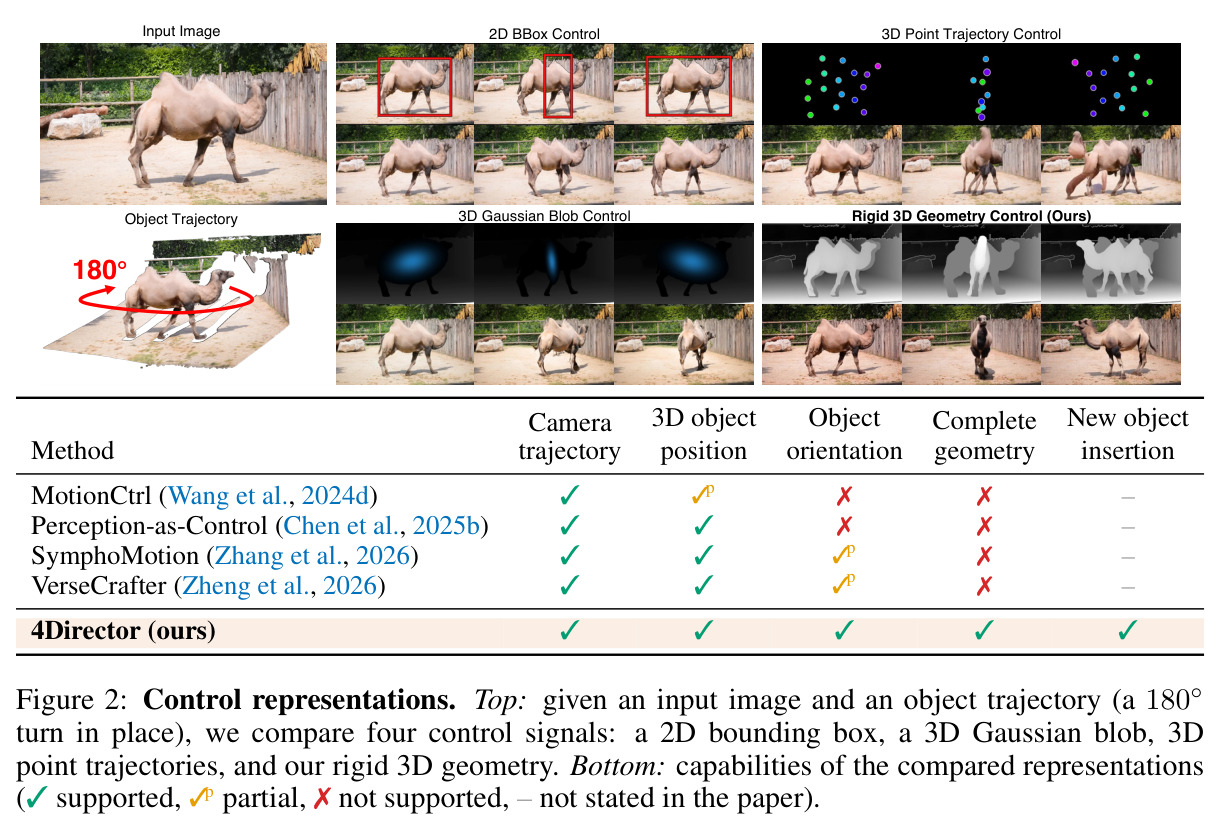
专业视频制作需要对相机和物体运动做精确导演,但现有可控视频生成方法分两类、各有硬伤。第一类是图像平面线索(拖拽路径、2D边界框、掩码、2D点轨迹,如MotionCtrl):一个2D投影对应多种3D运动——边界框不决定物体朝向,一个变小的框分不清物体在远离还是本身在缩小,一条2D路径混淆了相机视差与物体自身运动;论文实验显示MotionCtrl在评测中只有32.6%的帧能保住物体身份。第二类是3D控制(3D轨迹、6-DoF位姿、3D框,或从输入图提升的代理:SymphoMotion的逐点3D轨迹、Perception-as-Control跟踪部位上的球体、VerseCrafter每物体一个3D高斯椭球):几何不完整——轨迹和框根本没有表面,提升出来的代理只有图像里看得见的外壳,转身或换视角后新露出的部分没有任何几何,只能靠生成器每帧重新'脑补',容易不一致;逐点轨迹的写法本身也很繁琐。

本文的目标是本文要做一个'导演式'的视频世界模型:给定一张输入图、一段文本、一条相机轨迹 $\{E_t\}_{t=1}^F$ 和用户在图中标注的每个物体的刚体轨迹 $\{T_t^o\}_{t=1}^F$($T_t^o=(R_t^o,t_t^o)\in SE(3)$),合成F帧视频——从该图出发,严格跟随相机与物体轨迹,保持物体身份不变,同时由生成器自动补全非刚性动态(如跑动中的四肢摆动)、光照以及相机移动新揭示的背景。用户只负责设计刚体层面的轨迹,其余细节交给模型。

与已有工作不同的是,本文的独特切入不是设计更强的条件编码器,而是把控制表示本身升级为一个显式4D场景:每个物体从输入图一次性重建为完整的canonical mesh(各个方向都有表面),每帧只用一个刚体变换移动它,网格、背景点云与相机共享同一个坐标系。由此带来三个别的表示给不了的性质:(1) 转身或新视角露出的表面是被渲染出来的确定信息,而非逐帧重新生成;(2) 一个刚体变换移动整个物体,天然免去逐点轨迹;(3) 因为适配器训练时见到的都是从'自动恢复的刚体场景'渲染的深度视频,推理时用户手工导演的场景与训练分布完全一致,新轨迹、新物体插入零额外训练。

核心方法

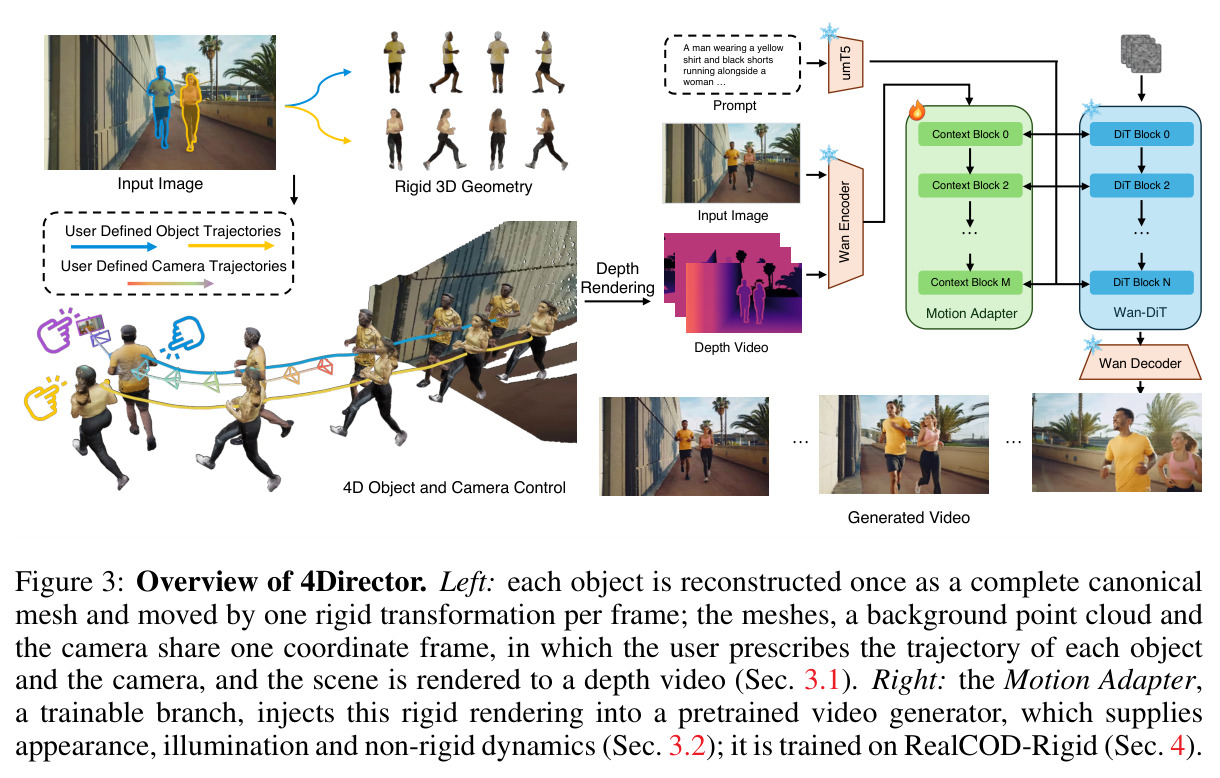
直觉上,4Director把'精确控制'与'合理补全'做了彻底分工:几何上已经确定的东西——视点、遮挡顺序、物体朝向、刚体运动、轮廓——交给显式4D场景并渲染成深度视频;外观、光照、非刚性动态、新露出的背景交给预训练视频生成器。技术路线分四步:第一步单图提升为3D,用MoGe-2估计深度与内参 $K$,SAM 2把用户点击变成物体掩码,掩码外像素反投影成静态背景点云 $P$,每个物体用Pixal3D重建完整canonical mesh并按掩码与深度对齐;第二步用户在3D查看器里用关键帧编排相机轨迹 $\{E_t\}$ 和每个物体的刚体轨迹 $\{T_t^o\}$($T_1^o$ 为单位阵),新物体可从另一张参考图重建网格后插入,其纹理网格被渲染进输入图作为第一帧;第三步逐帧把背景点云与摆好位置的网格投影成深度图(每像素取最近表面),得到8-bit灰度深度控制视频 $C$;第四步Motion Adapter(3.0B可训练分支)把 $C$ 与输入图像经VAE编码注入冻结的Wan2.1-VACE-14B主干DiT,在RealCOD-Rigid数据集上用流匹配目标训练。

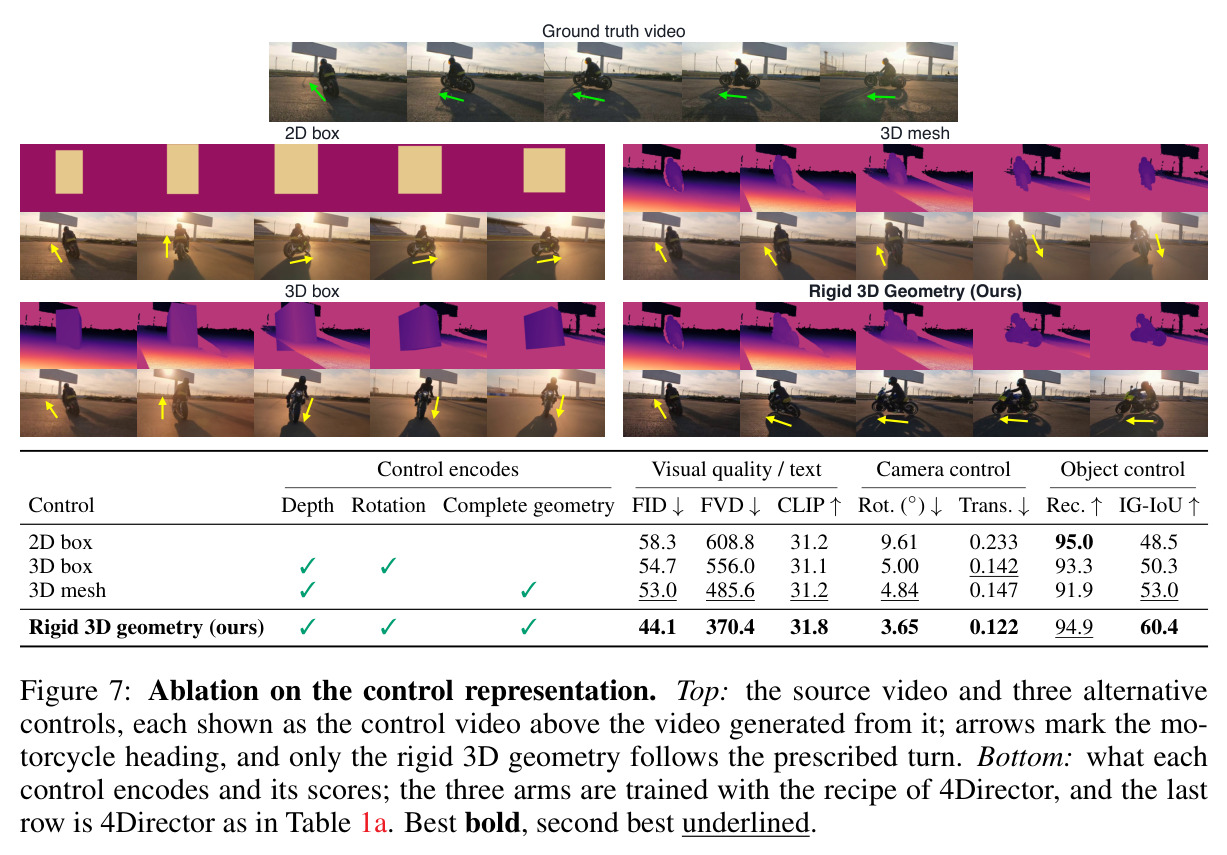
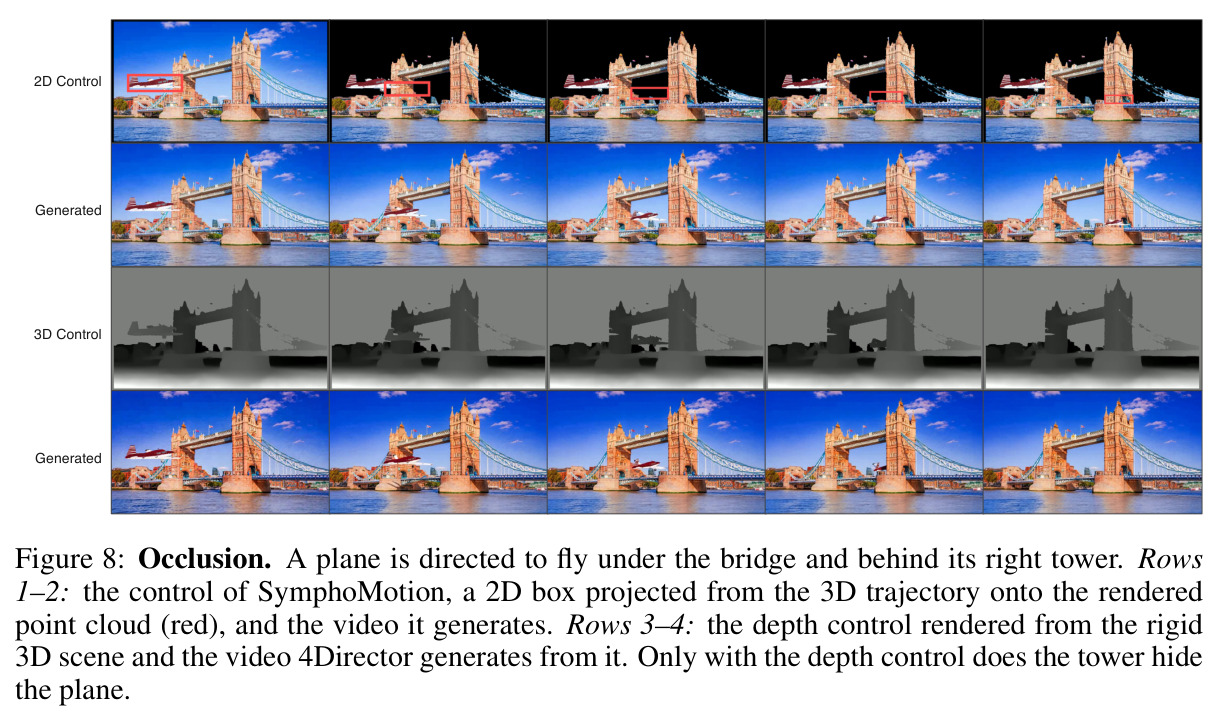
核心创新是'完整几何+单刚体变换'的4D场景表示,以及'深度视频作为唯一几何接口'的设计。与VerseCrafter的每物体一个高斯椭球、SymphoMotion的3D点轨迹相比,本质区别在于:网格在所有方向都有表面,所以物体转身后看到的表面是渲染出来的确定信息,而不是生成器逐帧幻觉——这是消融里不旋转的3D mesh(IG-IoU 53.0)与完整表示(60.4)差距的根源;同时逐像素取最近表面的深度图让遮挡顺序(谁在前谁在后)在生成之前就固定(附录E中飞机钻桥洞被塔遮住的案例)。训练设计同样关键:论文Eq.(3)把表面点位置分解为 $X_t^i=R_t^o Y_i+t_t^o+r_t^i$,其中 $Y_i$ 是canonical mesh上的位置,前两项是刚体运动、残差 $r_t^i$ 是非刚性运动(如摆动的手臂),控制视频里只含刚体前两项——适配器因此被明确训练成'严格跟随刚体几何、其余全靠生成',职责边界清晰。

方法步骤详情

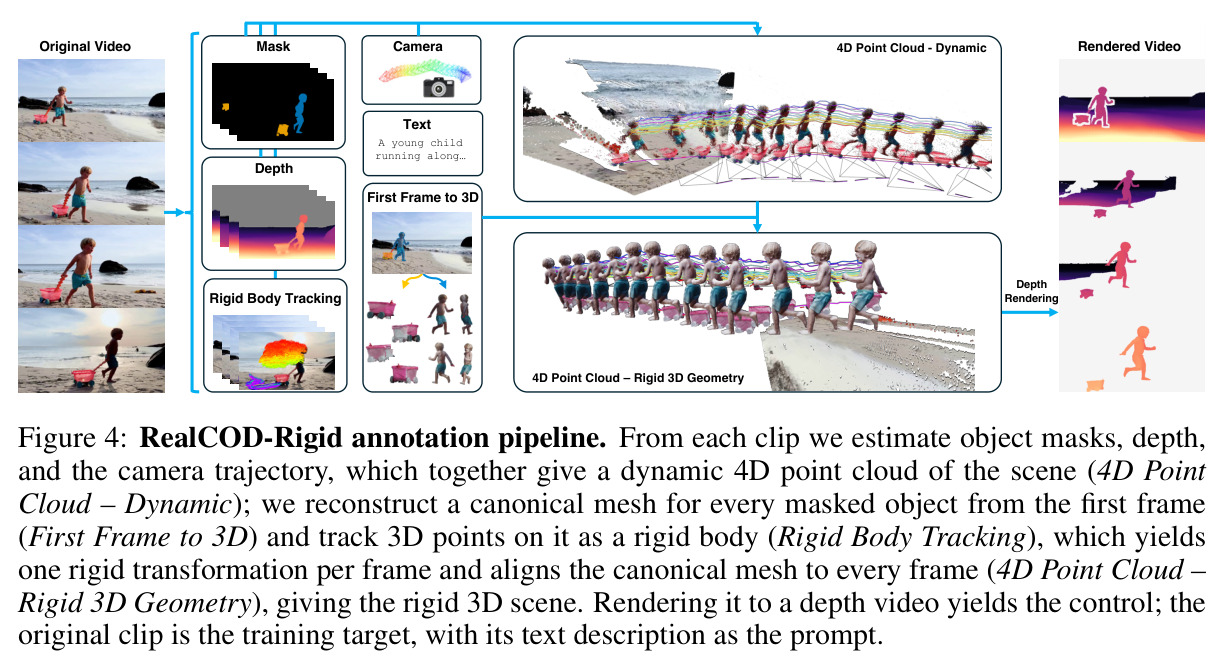
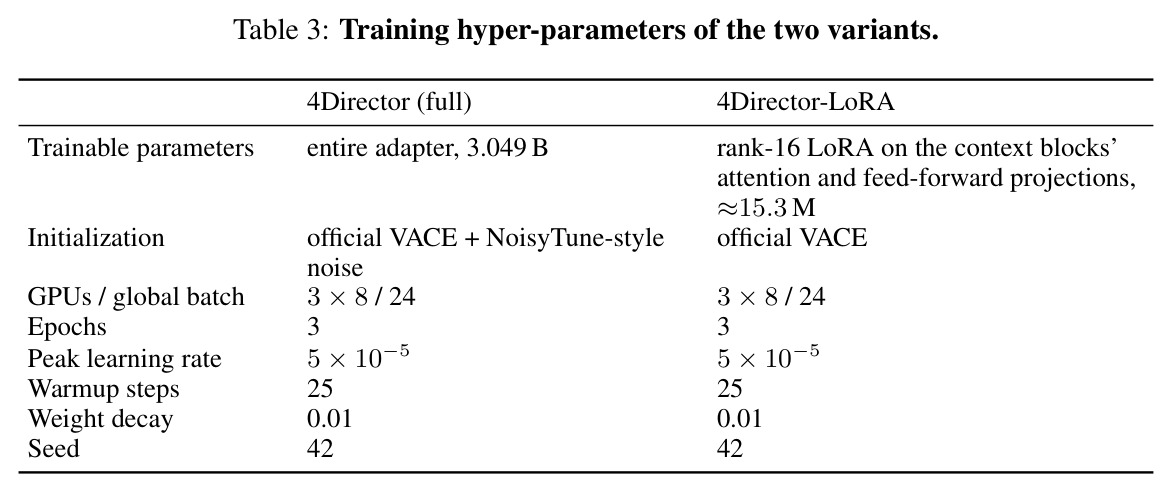
流程分四步。(1) 场景构建:MegaSaM(以MoGe-2为深度先验、UniDepthV2为度量分支)输出每帧深度、内参 $K$ 与相机轨迹 $\{E_t\}$,建立共享坐标系;SAM 2把用户点击变成掩码,掩码外像素反投影为背景点云 $P$;每个物体用Pixal3D从首帧crop重建10万面纹理canonical mesh $M_o$,经Umeyama相似变换对齐(残差须满足median$\le$0.15d、p90$\le$0.30d、p95$\le$0.50d且轮廓IoU$\ge$0.5)。(2) 刚体跟踪:TAPIP3D(16帧窗口、步长8、正反向各一遍)在掩码内采1024条3D轨迹(8锚帧×128最远点查询,可见性$\ge$0.9),再以RANSAC(阈值0.035d)加Tukey重加权交替'拟合+选内点'找出刚性一致的稳定核 $\Omega_o$(至少30条轨迹),按 Eq.(5) $\arg\min_{R,t}\sum_{i\in\Omega_o}\rho\|RY_i+t-X_t^i\|$ 解出每帧变换 $T_t^o$。(3) 深度渲染:逐帧把点云与摆好位的网格投影,每像素取最近表面深度,按Eq.(7)编码为8-bit灰度(范围取各实体 $1/Z$ 的1%/99%分位包络,无效像素128)。(4) 适配器训练:从VACE官方分支初始化并做NoisyTune式微扰,24卡、全局batch 24、bf16、81×832×480、3 epochs、AdamW峰值学习率 $5\times10^{-5}$、warmup 25步,最小化流匹配损失;推理20步采样、CFG 5.0。数据上RealCOD-25K的25,318段clip经此流水线全通过者构成20,774段RealCOD-Rigid。

技术新颖性

新颖性体现在四个层面。表示层面:这是首批把'完整物体网格+逐帧SE(3)变换+相机/背景/物体统一坐标系'作为视频世界模型控制接口的工作,直接补上了2D线索(深度朝向歧义)与3D代理(只有可见外壳)之间的空档。模型层面:Motion Adapter证明一段纯深度视频这一极简通道足以同时精确驱动相机与物体控制,且因为推理控制与训练控制同分布,新轨迹、新物体插入完全免训练。数据层面:RealCOD-Rigid的自动标注流水线(MegaSaM+Pixal3D+TAPIP3D+稳定核鲁棒拟合)把无任何3D标注的真实网络视频变成'clip-刚体3D场景'成对训练数据,25,318段中20,774段通过全部门槛。评测层面:Identity-Gated IoU用VLM门控修掉了普通mask IoU'位置对但物体已经不是原物体也给分'的评分漏洞,为物体控制提供了更合理的度量。
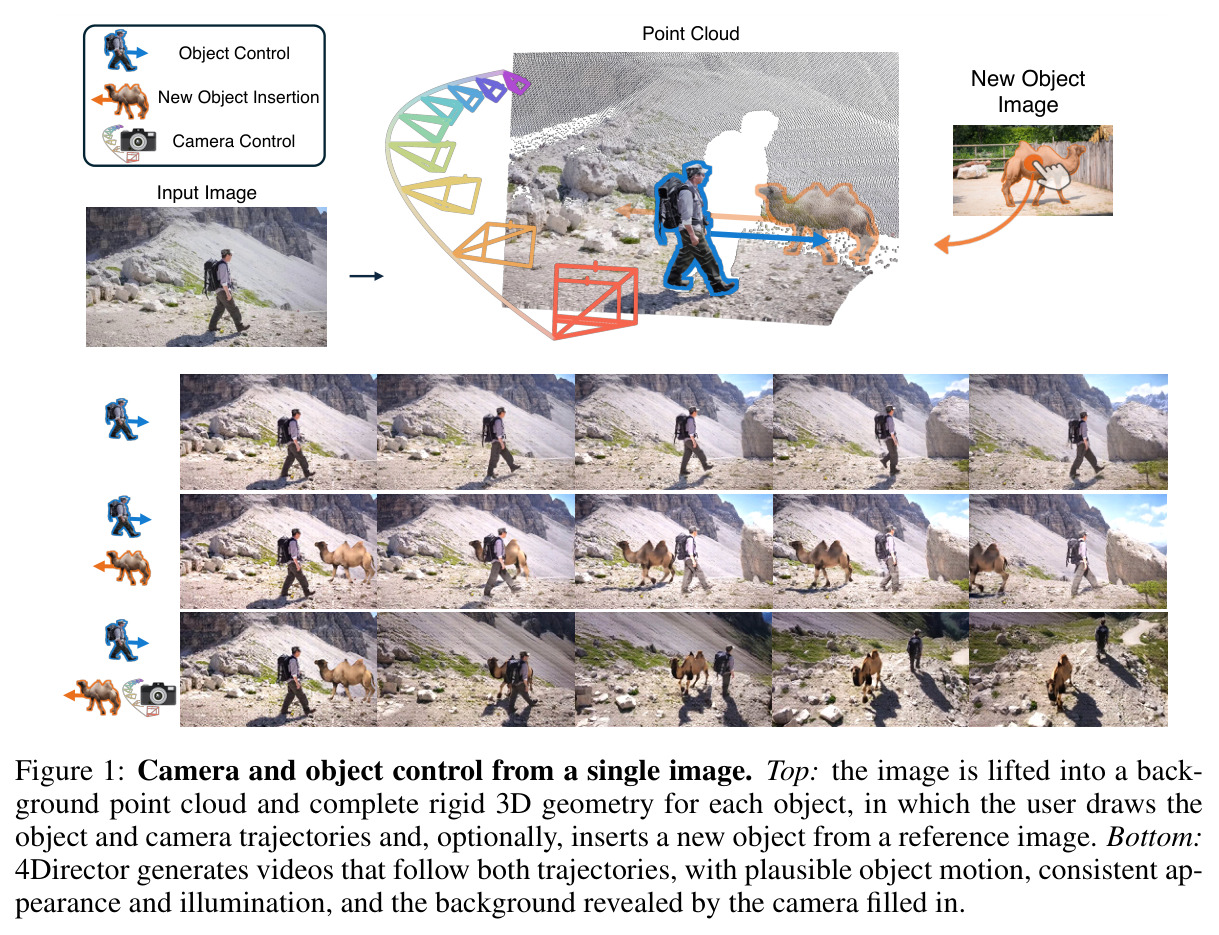
Camera and object control from a single image. Top: the image is lifted into a background point cloud and complete rigid 3D geometry for each object, in which the user draws the object and camera trajectories and, optionally, inserts a new object from a reference image. Bottom: 4Director generates videos that follow both trajectories, with plausible object motion, consistent appearance and illumination, and the background revealed by the camera filled in.
Figure 1: Camera and object control from a single image. Top: the image is lifted into a background point cloud and complete rigid 3D geometry for each object, in which the user draws the object and camera trajectories and, optionally, inserts a new object from a reference image. Bottom: 4Director generates videos that follow both trajectories, with plausible object motion, consistent appearance and illumination, and the background revealed by the camera filled in.
Overview of 4Director. Left: each object is reconstructed once as a complete canonical mesh and moved by one rigid transformation per frame; the meshes, a background point cloud and the camera share one coordinate frame, in which the user prescribes the trajectory of each object and the camera, and the scene is rendered to a depth video (Sec. 3.1). Right: the Motion Adapter, a trainable branch, injects this rigid rendering into a pretrained video generator, which supplies appearance, illumination and non-rigid dynamics (Sec. 3.2); it is trained on RealCOD-Rigid (Sec. 4).
Figure 3: Overview of 4Director. Left: each object is reconstructed once as a complete canonical mesh and moved by one rigid transformation per frame; the meshes, a background point cloud and the camera share one coordinate frame, in which the user prescribes the trajectory of each object and the camera, and the scene is rendered to a depth video (Sec. 3.1). Right: the Motion Adapter, a trainable branch, injects this rigid rendering into a pretrained video generator, which supplies appearance, illumination and non-rigid dynamics (Sec. 3.2); it is trained on RealCOD-Rigid (Sec. 4).
RealCOD-Rigid annotation pipeline. From each clip we estimate object masks, depth, and the camera trajectory, which together give a dynamic 4D point cloud of the scene (4D Point Cloud – Dynamic); we reconstruct a canonical mesh for every masked object from the first frame (First Frame to 3D) and track 3D points on it as a rigid body (Rigid Body Tracking), which yields one rigid transformation per frame and aligns the canonical mesh to every frame (4D Point Cloud – Rigid 3D Geometry), giving the rigid 3D scene. Rendering it to a depth video yields the control; the original clip is the training target, with its text description as the prompt.
Figure 4: RealCOD-Rigid annotation pipeline. From each clip we estimate object masks, depth, and the camera trajectory, which together give a dynamic 4D point cloud of the scene (4D Point Cloud – Dynamic); we reconstruct a canonical mesh for every masked object from the first frame (First Frame to 3D) and track 3D points on it as a rigid body (Rigid Body Tracking), which yields one rigid transformation per frame and aligns the canonical mesh to every frame (4D Point Cloud – Rigid 3D Geometry), giving the rigid 3D scene. Rendering it to a depth video yields the control; the original clip is the training target, with its text description as the prompt.
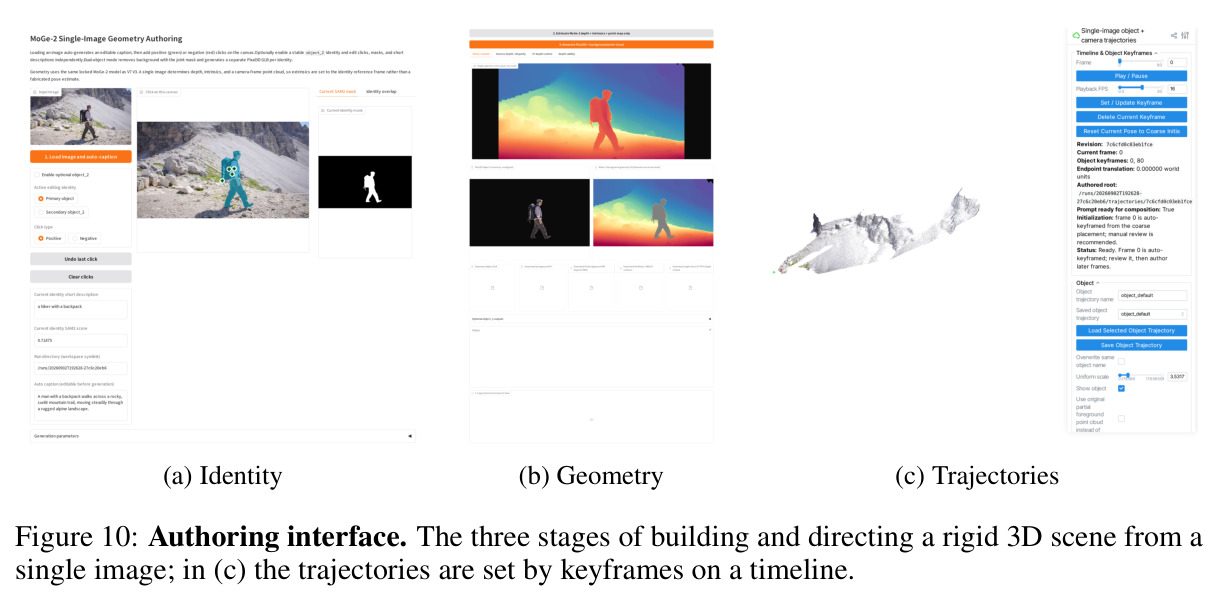
Authoring interface. The three stages of building and directing a rigid 3D scene from a single image; in (c) the trajectories are set by keyframes on a timeline.
Figure 10: Authoring interface. The three stages of building and directing a rigid 3D scene from a single image; in (c) the trajectories are set by keyframes on a timeline.

实验结果

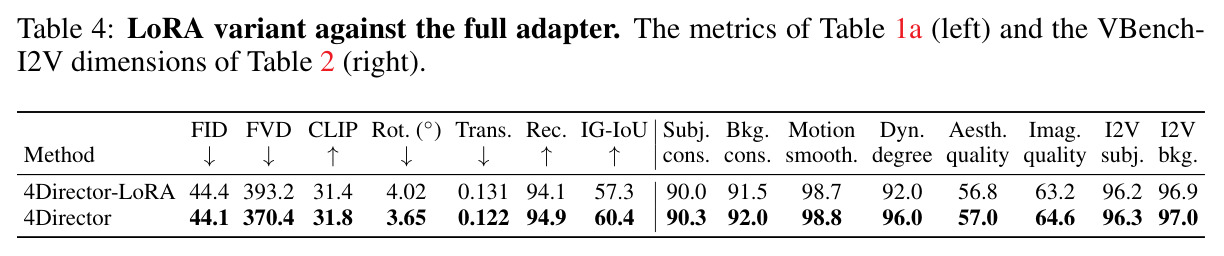
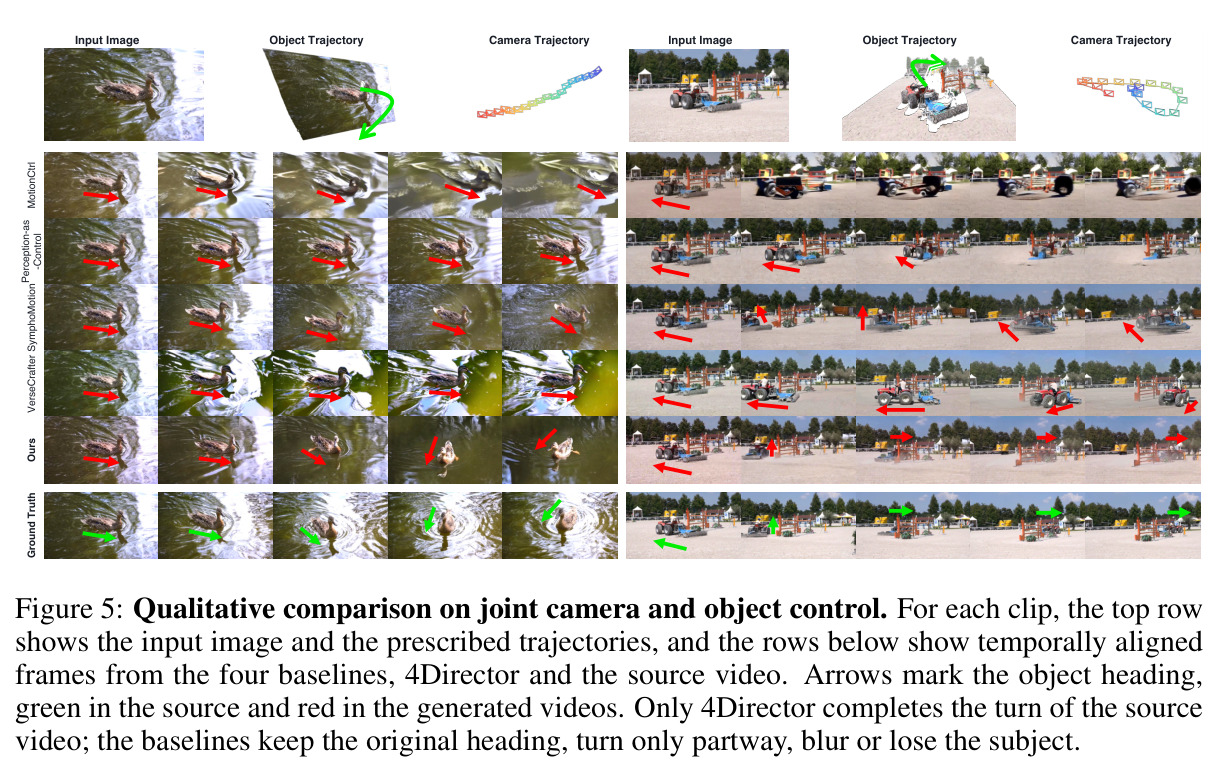
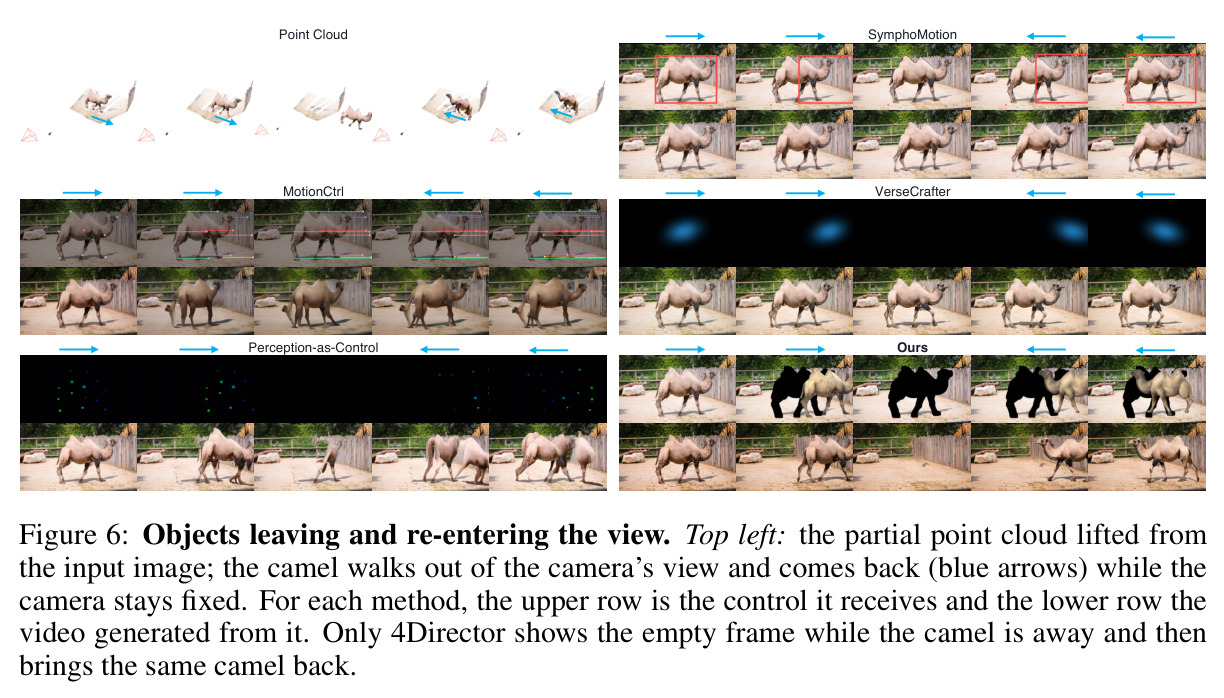
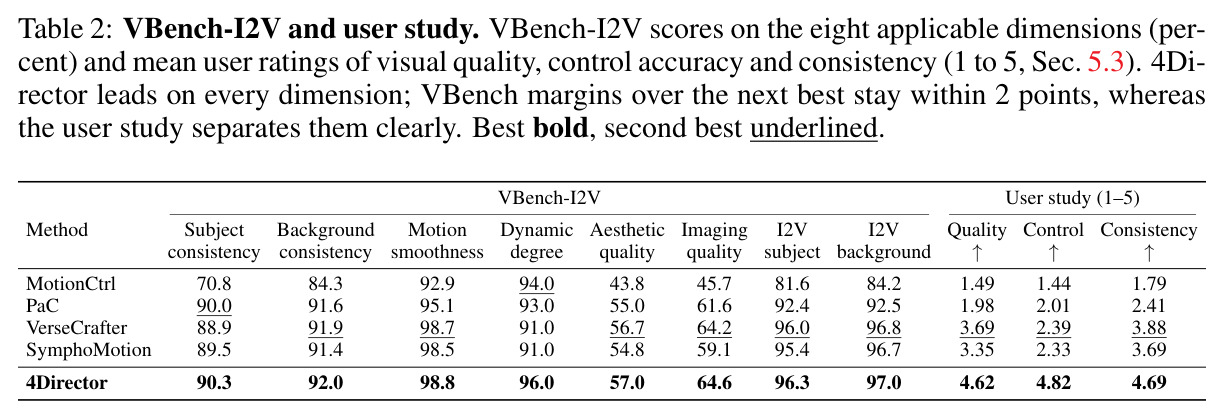
在RealCOD-25K排除训练的100个评测clip上与四个基线公平对比。视觉质量:FID 44.1(比次优SymphoMotion低3.7%)、FVD 370.4(低8.6%)、CLIP-SIM 31.8(与VerseCrafter持平)。相机控制:RotErr从次优的3.89°降到3.65°,TransErr 0.122较0.132降7.6%。物体控制差距最大:IG-IoU从VerseCrafter的54.8升至60.4(相对提升10.2%),而识别率几乎相同(94.9 vs 94.8),说明提升来自摆放更准而非更常保身份;MotionCtrl仅Rec 32.6、IG-IoU 18.8。VBench-I2V八维全部第一(主体一致性90.3、背景92.0、运动平滑98.8、动态程度96.0、美学57.0、成像64.6、I2V主体96.3、背景97.0)但幅度≤2分;用户研究(20人×9案例,1-5分)则显著拉开:视觉质量4.62、控制准确性4.82(次优仅2.39)、一致性4.69。消融(图7):2D box IG-IoU 48.5、RotErr 9.61°;3D box 50.3;不旋转3D mesh 53.0;完整刚体几何60.4,各方案识别率均在91.9-95.0,证明损失主要在摆放,'完整表面'与'旋转'缺一不可。定性上(图5、15)只有4Director完成原地180°整转并复现拖拉机被栅栏遮挡;图6中骆驼离场时清空画面、回归时原样带回。LoRA变体(15.3M参数,表4)也超全部基线(IG-IoU 57.3、FVD 393.2),完整版各项仍更优(RotErr 4.02°→3.65°)。
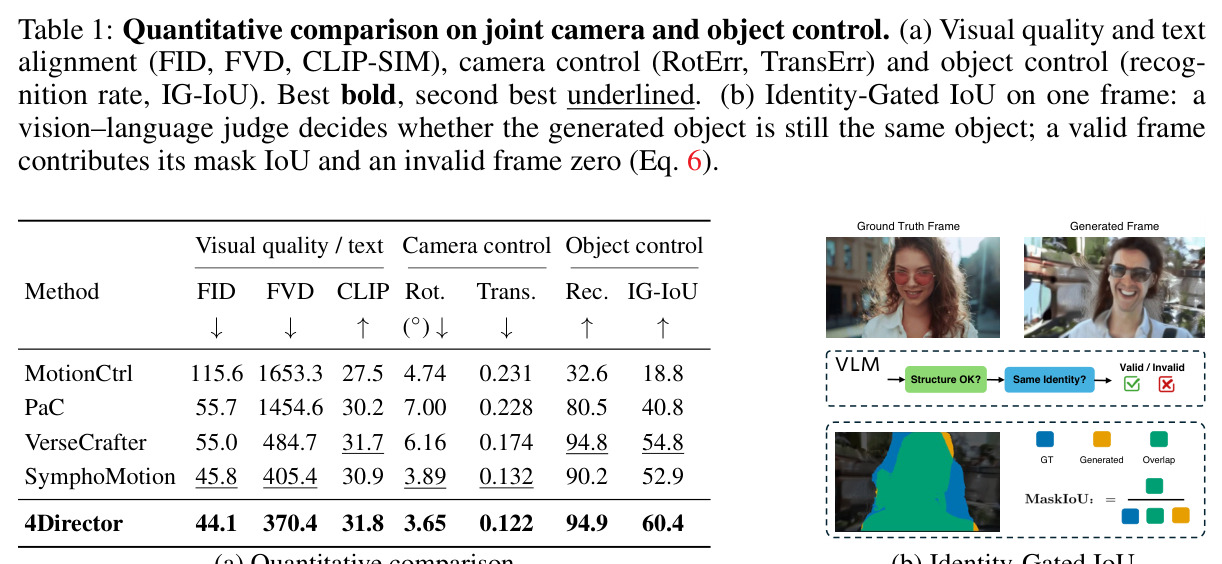
Quantitative comparison on joint camera and object control. (a) Visual quality and text alignment (FID, FVD, CLIP-SIM), camera control (RotErr, TransErr) and object control (recognition rate, IG-IoU). Best bold, second best underlined. (b) Identity-Gated IoU on one frame: a vision–language judge decides whether the generated object is still the same object; a valid frame contributes its mask IoU and an invalid frame zero (Eq. 6).
Table 1: Quantitative comparison on joint camera and object control. (a) Visual quality and text alignment (FID, FVD, CLIP-SIM), camera control (RotErr, TransErr) and object control (recognition rate, IG-IoU). Best bold, second best underlined. (b) Identity-Gated IoU on one frame: a vision–language judge decides whether the generated object is still the same object; a valid frame contributes its mask IoU and an invalid frame zero (Eq. 6).
VBench-I2V and user study. VBench-I2V scores on the eight applicable dimensions (percent) and mean user ratings of visual quality, control accuracy and consistency (1 to 5, Sec. 5.3). 4Director leads on every dimension; VBench margins over the next best stay within 2 points, whereas the user study separates them clearly. Best bold, second best underlined.
Table 2: VBench-I2V and user study. VBench-I2V scores on the eight applicable dimensions (percent) and mean user ratings of visual quality, control accuracy and consistency (1 to 5, Sec. 5.3). 4Director leads on every dimension; VBench margins over the next best stay within 2 points, whereas the user study separates them clearly. Best bold, second best underlined.
Training hyper-parameters of the two variants.
Table 3: Training hyper-parameters of the two variants.
LoRA variant against the full adapter. The metrics of Table 1a (left) and the VBench-I2V dimensions of Table 2 (right).
Table 4: LoRA variant against the full adapter. The metrics of Table 1a (left) and the VBench-I2V dimensions of Table 2 (right).
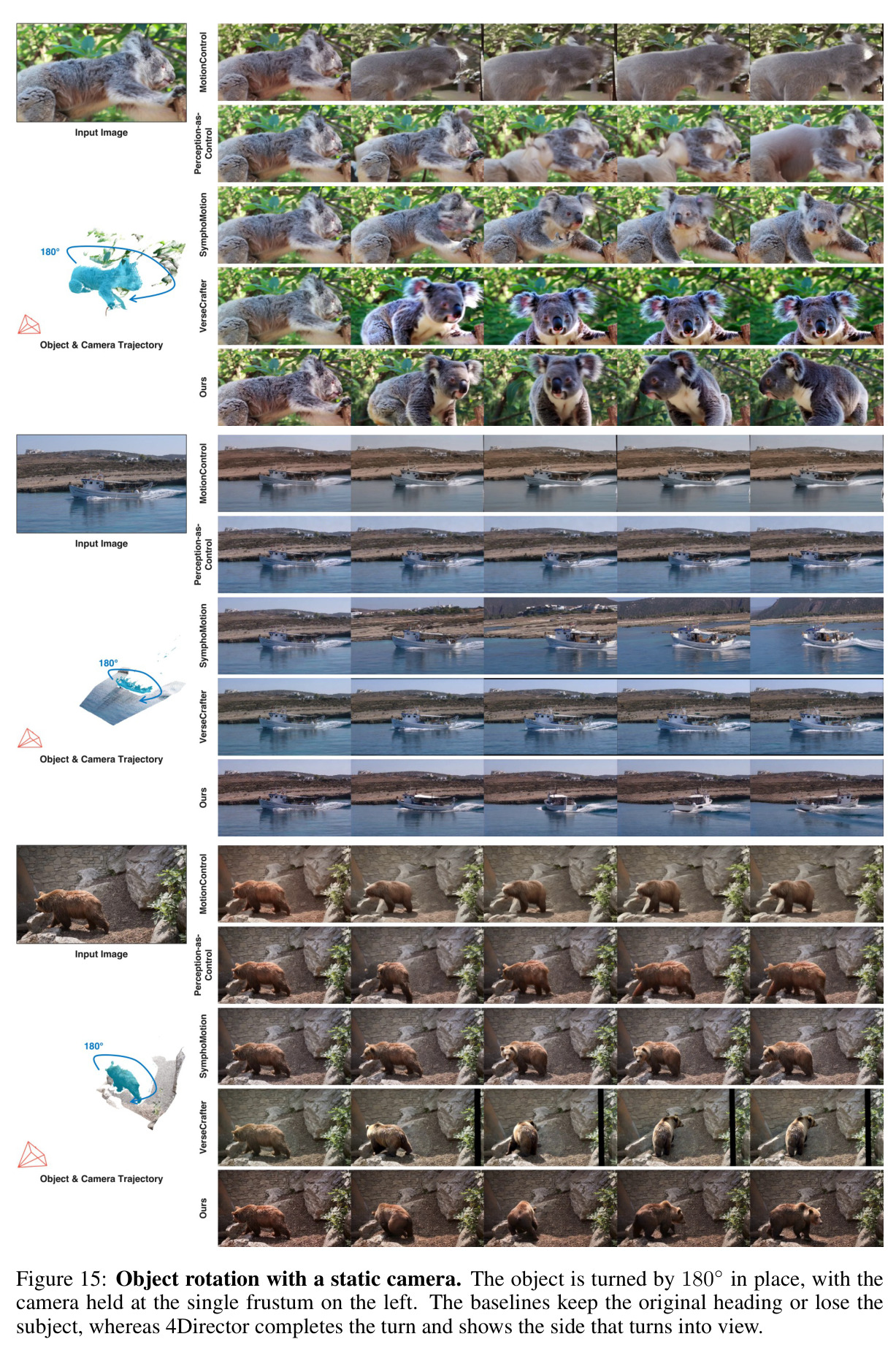
Qualitative comparison on joint camera and object control. For each clip, the top row shows the input image and the prescribed trajectories, and the rows below show temporally aligned frames from the four baselines, 4Director and the source video. Arrows mark the object heading, green in the source and red in the generated videos. Only 4Director completes the turn of the source video; the baselines keep the original heading, turn only partway, blur or lose the subject.
Figure 5: Qualitative comparison on joint camera and object control. For each clip, the top row shows the input image and the prescribed trajectories, and the rows below show temporally aligned frames from the four baselines, 4Director and the source video. Arrows mark the object heading, green in the source and red in the generated videos. Only 4Director completes the turn of the source video; the baselines keep the original heading, turn only partway, blur or lose the subject.
Objects leaving and re-entering the view. Top left: the partial point cloud lifted from the input image; the camel walks out of the camera's view and comes back (blue arrows) while the camera stays fixed. For each method, the upper row is the control it receives and the lower row the video generated from it. Only 4Director shows the empty frame while the camel is away and then brings the same camel back.
Figure 6: Objects leaving and re-entering the view. Top left: the partial point cloud lifted from the input image; the camel walks out of the camera's view and comes back (blue arrows) while the camera stays fixed. For each method, the upper row is the control it receives and the lower row the video generated from it. Only 4Director shows the empty frame while the camel is away and then brings the same camel back.
Ablation on the control representation. Top: the source video and three alternative controls, each shown as the control video above the video generated from it; arrows mark the motorcycle heading, and only the rigid 3D geometry follows the prescribed turn. Bottom: what each control encodes and its scores; the three arms are trained with the recipe of 4Director, and the last row is 4Director as in Table 1a. Best bold, second best underlined.
Figure 7: Ablation on the control representation. Top: the source video and three alternative controls, each shown as the control video above the video generated from it; arrows mark the motorcycle heading, and only the rigid 3D geometry follows the prescribed turn. Bottom: what each control encodes and its scores; the three arms are trained with the recipe of 4Director, and the last row is 4Director as in Table 1a. Best bold, second best underlined.
Occlusion. A plane is directed to fly under the bridge and behind its right tower. Rows 1–2: the control of SymphoMotion, a 2D box projected from the 3D trajectory onto the rendered point cloud (red), and the video it generates. Rows 3–4: the depth control rendered from the rigid 3D scene and the video 4Director generates from it. Only with the depth control does the tower hide the plane.
Figure 8: Occlusion. A plane is directed to fly under the bridge and behind its right tower. Rows 1–2: the control of SymphoMotion, a 2D box projected from the 3D trajectory onto the rendered point cloud (red), and the video it generates. Rows 3–4: the depth control rendered from the rigid 3D scene and the video 4Director generates from it. Only with the depth control does the tower hide the plane.
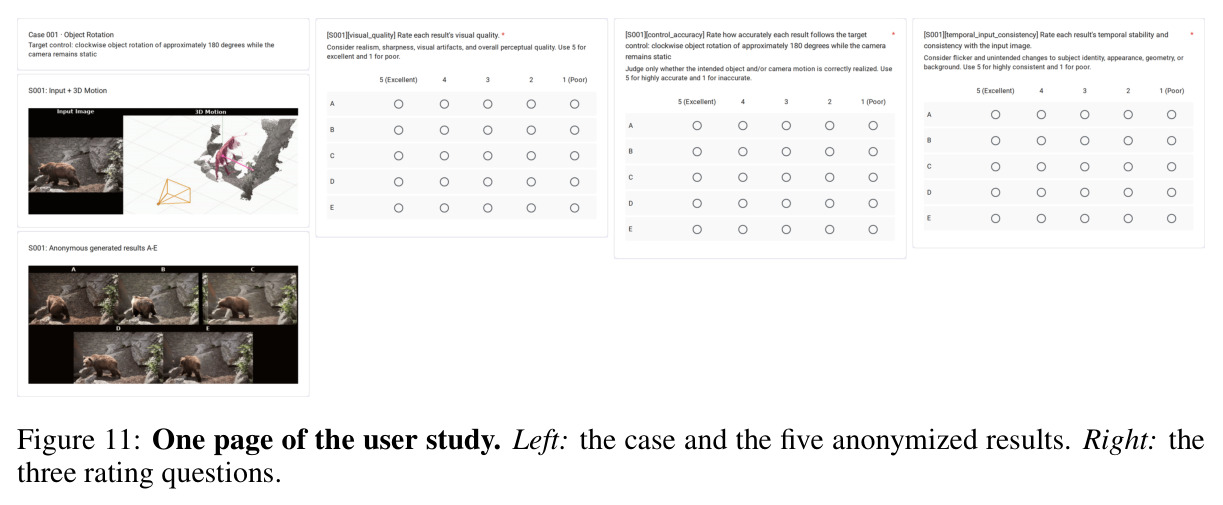
One page of the user study. Left: the case and the five anonymized results. Right: the three rating questions.
Figure 11: One page of the user study. Left: the case and the five anonymized results. Right: the three rating questions.
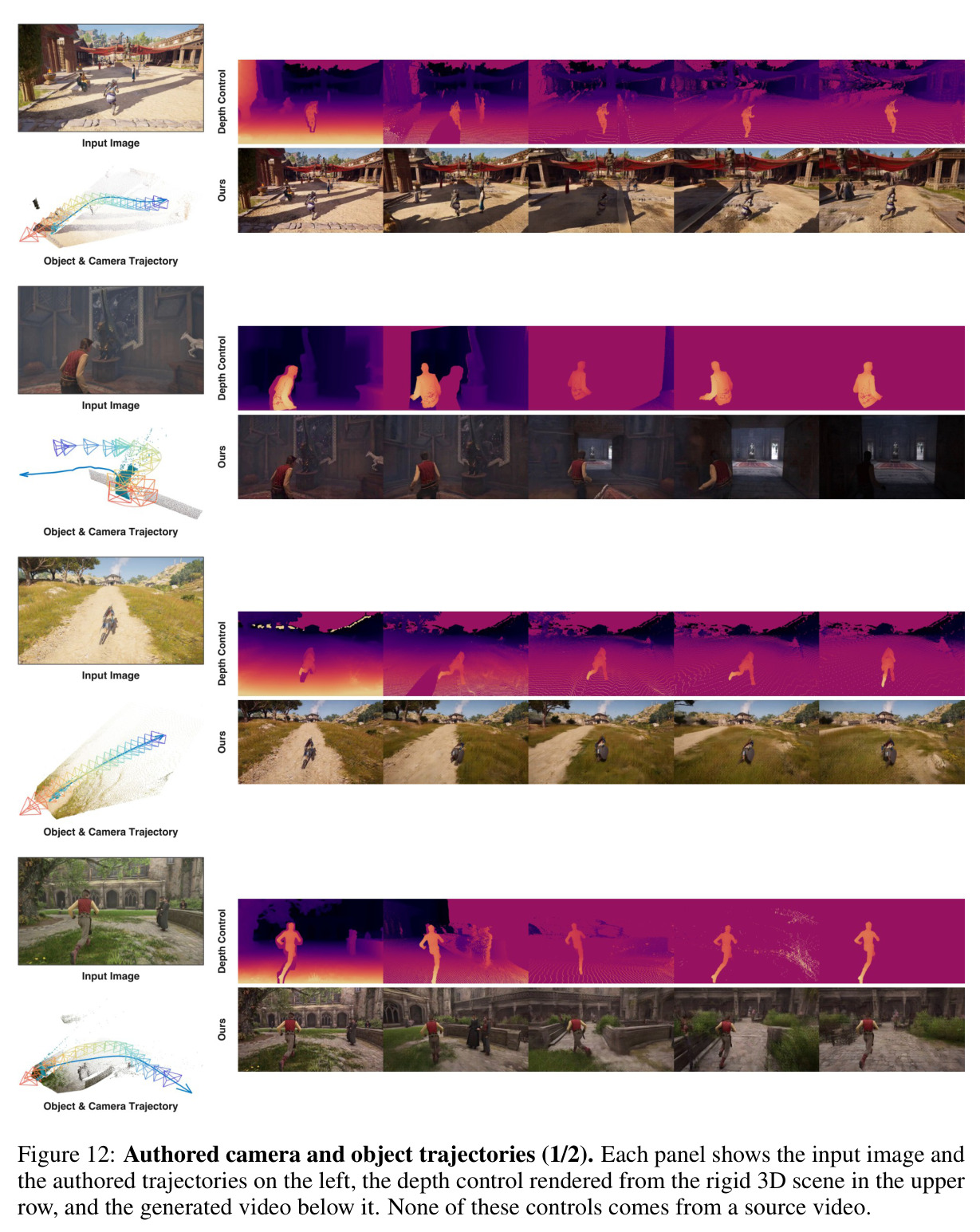
Authored camera and object trajectories (1/2). Each panel shows the input image and the authored trajectories on the left, the depth control rendered from the rigid 3D scene in the upper row, and the generated video below it. None of these controls comes from a source video.
Figure 12: Authored camera and object trajectories (1/2). Each panel shows the input image and the authored trajectories on the left, the depth control rendered from the rigid 3D scene in the upper row, and the generated video below it. None of these controls comes from a source video.
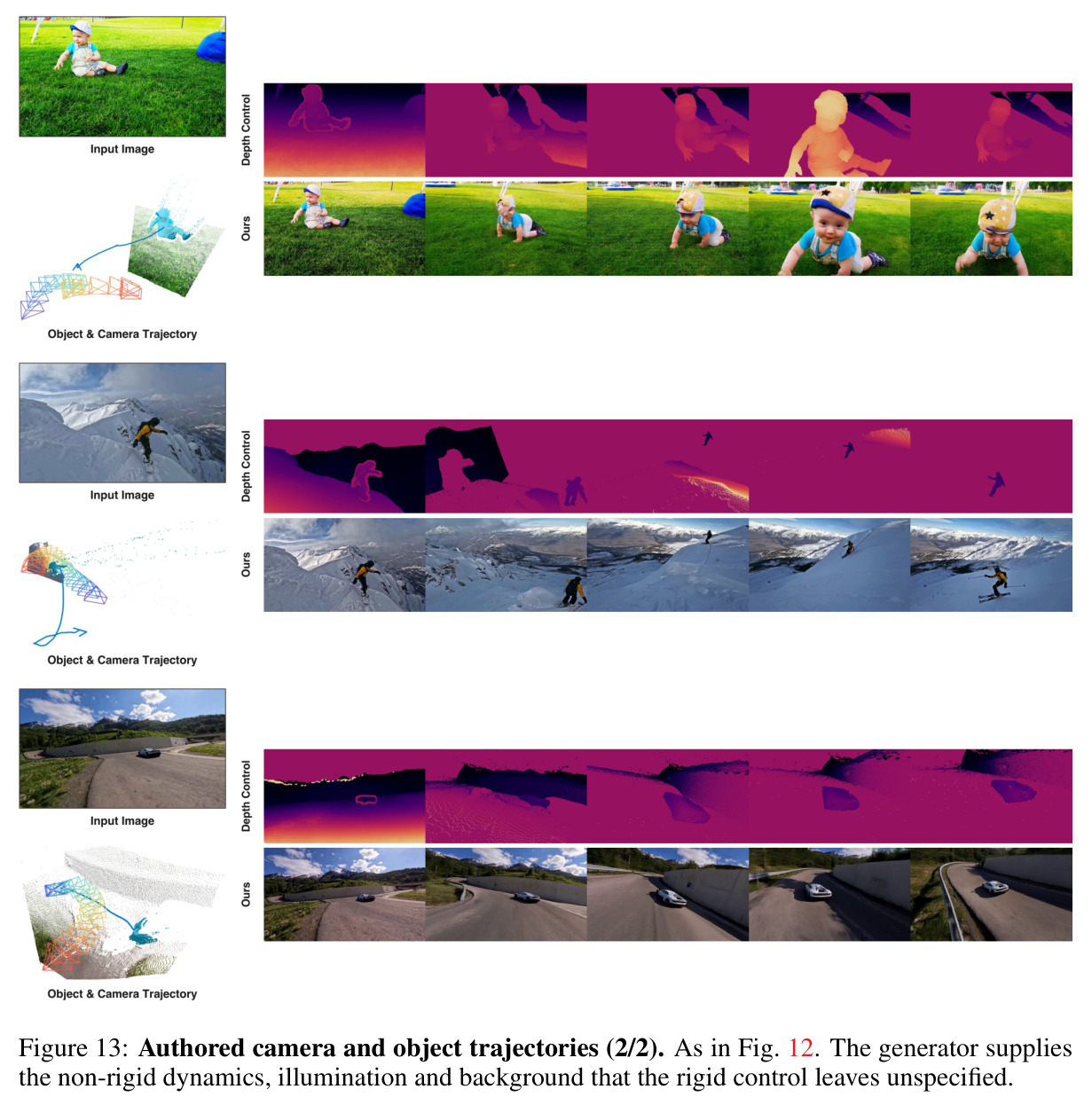
Authored camera and object trajectories (2/2). As in Fig. 12. The generator supplies the non-rigid dynamics, illumination and background that the rigid control leaves unspecified.
Figure 13: Authored camera and object trajectories (2/2). As in Fig. 12. The generator supplies the non-rigid dynamics, illumination and background that the rigid control leaves unspecified.
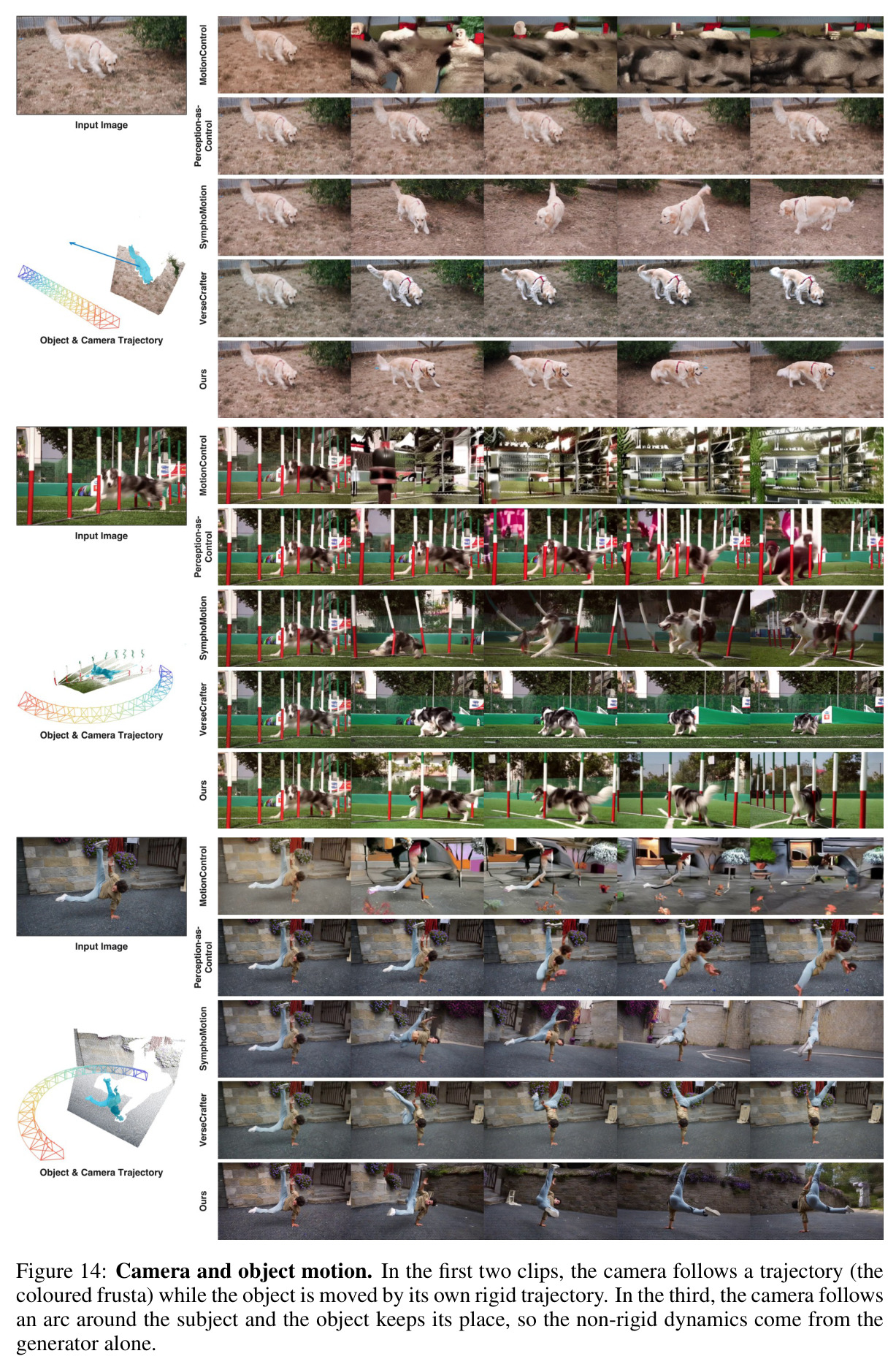
Camera and object motion. In the first two clips, the camera follows a trajectory (the coloured frusta) while the object is moved by its own rigid trajectory. In the third, the camera follows an arc around the subject and the object keeps its place, so the non-rigid dynamics come from the generator alone.
Figure 14: Camera and object motion. In the first two clips, the camera follows a trajectory (the coloured frusta) while the object is moved by its own rigid trajectory. In the third, the camera follows an arc around the subject and the object keeps its place, so the non-rigid dynamics come from the generator alone.
Object rotation with a static camera. The object is turned by 180° in place, with the camera held at the single frustum on the left. The baselines keep the original heading or lose the subject, whereas 4Director completes the turn and shows the side that turns into view.
Figure 15: Object rotation with a static camera. The object is turned by 180° in place, with the camera held at the single frustum on the left. The baselines keep the original heading or lose the subject, whereas 4Director completes the turn and shows the side that turns into view.
查看结构化数据
任务指标本文基线提升
联合相机与物体控制——物体摆放精度 IG-IoU ↑ 60.4 VerseCrafter 54.8(次优);SymphoMotion 52.9;PaC 40.8;MotionCtrl 18.8 +5.6(相对提升10.2%),且识别率94.9与次优94.8持平,说明是摆放更准而非更常保身份
视觉质量 FID ↓ 44.1 SymphoMotion 45.8(次优) 降低3.7%
视觉质量(视频) FVD ↓ 370.4 SymphoMotion 405.4(次优) 降低8.6%
相机控制 RotErr(旋转误差,°)↓ 3.65 SymphoMotion 3.89(次优) 降低0.24°(约6.2%)
相机控制 TransErr(相对平移误差)↓ 0.122 SymphoMotion 0.132(次优) 降低7.6%
文本对齐 CLIP-SIM ↑ 31.8 VerseCrafter 31.7(次优) +0.1,基本持平
用户研究——控制准确性 主观评分(1–5) 4.82 VerseCrafter 2.39(次优) +2.43,所有评测中差距最大的维度
用户研究——视觉质量 / 一致性 主观评分(1–5) 4.62 / 4.69 VerseCrafter 3.69 / 3.88(次优) +0.93 / +0.81
消融——控制表示 IG-IoU ↑(RotErr ↓) 刚体3D几何:60.4(3.65°) 2D box 48.5(9.61°)/ 3D box 50.3(5.00°)/ 不旋转3D mesh 53.0(4.84°) +7.4~+11.9,识别率各方案均在91.9–95.0,证明完整表面与旋转信息缺一不可
轻量化 IG-IoU / FVD 4Director-LoRA(15.3M参数):57.3 / 393.2 全部基线中最好为VerseCrafter 54.8 / 484.7 轻量版已超所有基线,完整适配器在全部指标上仍更优(如RotErr 3.65° vs 4.02°)

局限与改进

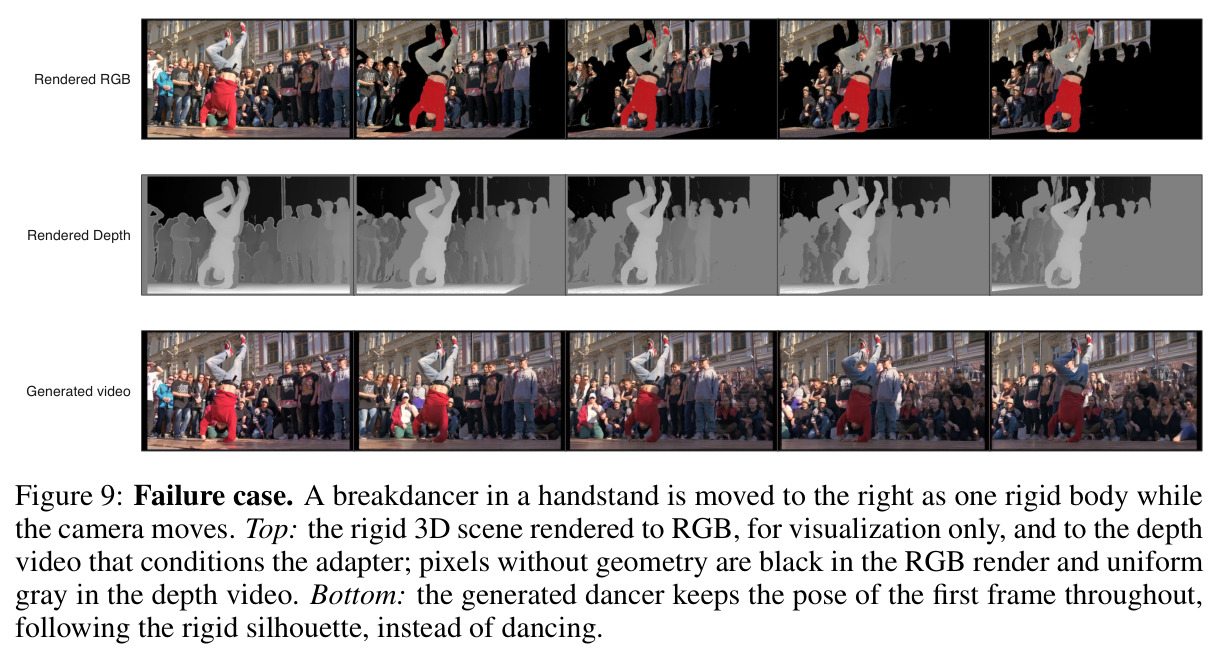
作者明确承认的局限是控制只到刚体层级:关节化或变形物体只能整体移动,跑步、跳跃、肢体动作这类非刚性运动无法指定,完全交给生成器,甚至会让一个明显关节化的物体全程保持首帧姿势(附录F的霹雳舞手倒立平移失败案例,图9);把刚体场景扩展为关节化部件是给出的下一步。我的补充观察:其一,整条流水线建立在MoGe-2、MegaSaM、SAM 2/3、Pixal3D、TAPIP3D等感知模型的误差传播之上,快速运动、严重遮挡、透明反光物体都会导致重建或跟踪失败——数据构建阶段25,318段clip只有20,774段(约82%)通过全部门槛,意味着约18%的真实素材被丢弃;其二,深度控制只传几何不传外观,物体外观基本被锚定在输入图上,换材质、换服装这类外观编辑不在能力范围内;其三,IG-IoU依赖Qwen3-VL-2B做身份裁判,裁判模型的偏差会直接进入指标,且论文自己指出前后对称物体的180°旋转在mask IoU上不受惩罚,只能靠定性展示;其四,分辨率与时长固定为832×480、81帧、16fps,推理要在14B DiT+3.0B适配器上跑20步采样,交互式编辑的成本不低。

独立分析的弱点

第一,关节运动不可指定是最实际的短板:想让人物跑步、挥手只能靠生成器即兴发挥,还可能出现图9中'保持倒立姿势平移'的僵化结果;改进方向是把物体建模为部件树(每部件一个mesh、关节约束连接),或增加预测非刚性残差 $r_t^i$ 的轻量分支,用少量关节关键帧控制肢体。第二,控制通道只用深度丢掉了现成信息:Pixal3D输出的是带纹理网格,法线、轮廓、分割图都可近乎零成本渲染,深度+法线+ID图的多通道控制有望进一步提升外观一致性。第三,标注流水线是分阶段串联系统,任一级失败即整段废弃(25,318段淘汰约18%),且误差逐级传导;可改用4D联合重建把mesh、轨迹、相机一起优化,提高数据利用率。第四,IG-IoU依赖Qwen3-VL-2B裁判,有成本与偏差,且前后对称物体的180°旋转在mask IoU上不受惩罚;可补充基于DINOv2特征的免裁判指标并用人评校准。第五,训练需24卡跑3.0B适配器,落地门槛高,应主推已达'超全部基线'水平的LoRA配置。

未来方向

作者提出的方向:一是把刚体3D场景扩展为关节化部件,使跑步、跳跃、肢体动作可以被显式指定(这直接对应图9的失败案例);二是附录J提出的持续学习——当新领域、新物体或新控制分布到来时持续适配世界模型,同时保留已学到的能力,可借鉴在线超参适应与外部数据辅助的知识保持。基于本文成果可自然延伸的方向:多物体交互与碰撞物理(当前多个刚体可各自指定轨迹但互不感知);用LLM把文字剧本自动转成3D关键帧轨迹,形成'文本→导演→视频'的自动分镜管线;把外观(重光照、材质替换)纳入场景元组 $\mathcal{S}=(P,\{M_o\},\{T_t^o\},K,\{E_t\})$ 实现外观级导演;结合更长的时程与流式生成,把该表示用于交互式世界探索、自动驾驶伪仿真和虚拟制片;以及把同一套'渲染几何+生成外观'的范式迁移到具身智能的sim2real数据合成。

复现评估

复现友好但工程量大。论文细节披露非常完整:全部训练超参(表3:24 GPU、batch 24、3 epochs、bf16、峰值学习率 $5\times10^{-5}$、seed 42)、推理设置(20步、CFG 5.0、sigma shift 5.0、832×480×81帧)、稳定核拟合全部阈值、深度编码公式,连IG-IoU的VLM裁判prompt全文都写在附录C.2。依赖模型均已开源:MegaSaM、MoGe-2、UniDepthV2、SAM 2/SAM3、Pixal3D、TAPIP3D、Wan2.1-VACE-14B、Qwen3-VL-2B;数据基于公开的RealCOD-25K。算力上完整版需3机8卡训练3.0B适配器,LoRA版仅15.3M参数、同数据同日程,是低成本复现首选;推理需14B DiT跑20步采样。风险点:官方目前只给出项目页(stability-ai.github.io/4director),代码与权重开放与否未明确承诺;若不开源,需自行实现渲染编码、稳定核拟合与评测协议(MegaSaM重估轨迹+Sim(3)对齐),工程量不小但细节足以支撑。综合评估:中高难度,LoRA路线可把门槛降到单机多卡。

相似论文推荐